

Configuration Notes – never forget why you configured WordPress that way.
Ever come back to a setting months later, find it looks odd, and can’t remember why you set it that way? You change it “blindly”… and something breaks.
Configuration Notes gives you a place to record the why behind your configuration choices, right inside the WordPress dashboard. The explanation stays where you need it — ready for future-you (or the next person who touches the site).
Free · Administrators only · No data sent anywhere · English and Italian
A problem every site owner knows
Every WordPress site is built on dozens of small decisions: a permalink structure chosen for SEO, a feature disabled for security, a cache exclusion so the cart doesn’t break, a checkbox set a certain way for a very specific reason.
At the time, the choice is obvious. Six months later, it isn’t. And memory doesn’t help: without the why, every change is a gamble.
Configuration Notes turns those decisions into a logbook, so you don’t have to trust your memory anymore.
What it does
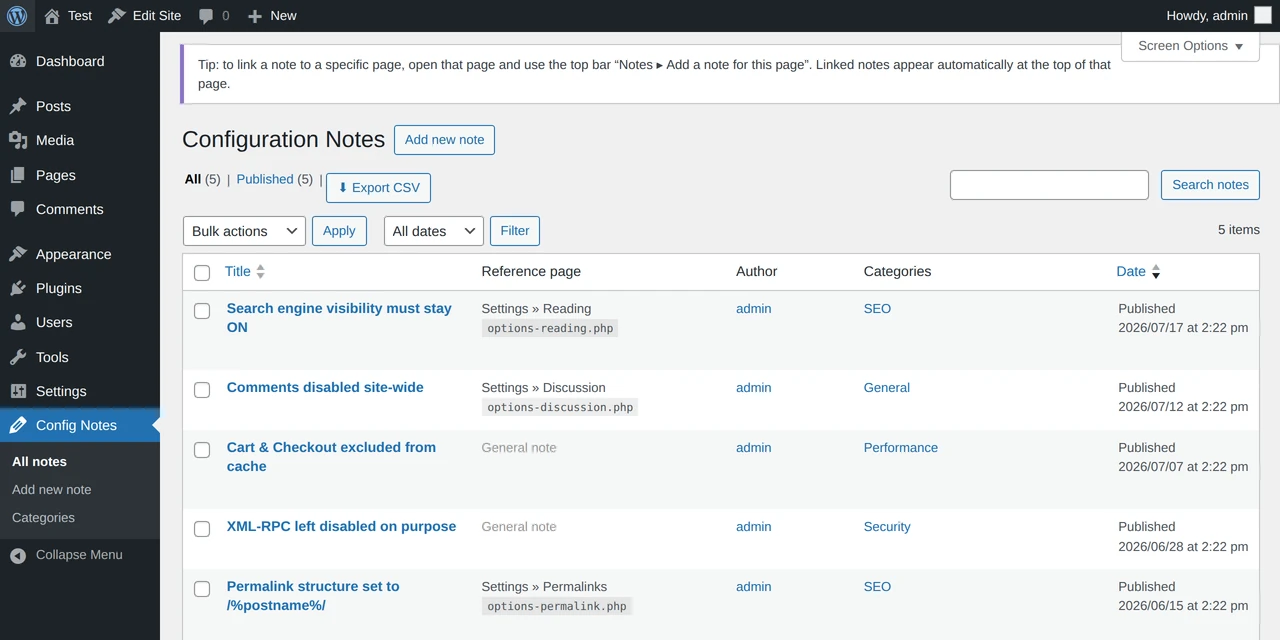
- Central decision register: A dedicated menu with all your notes: title, text, category, author and date. Your site’s logbook, always at hand.
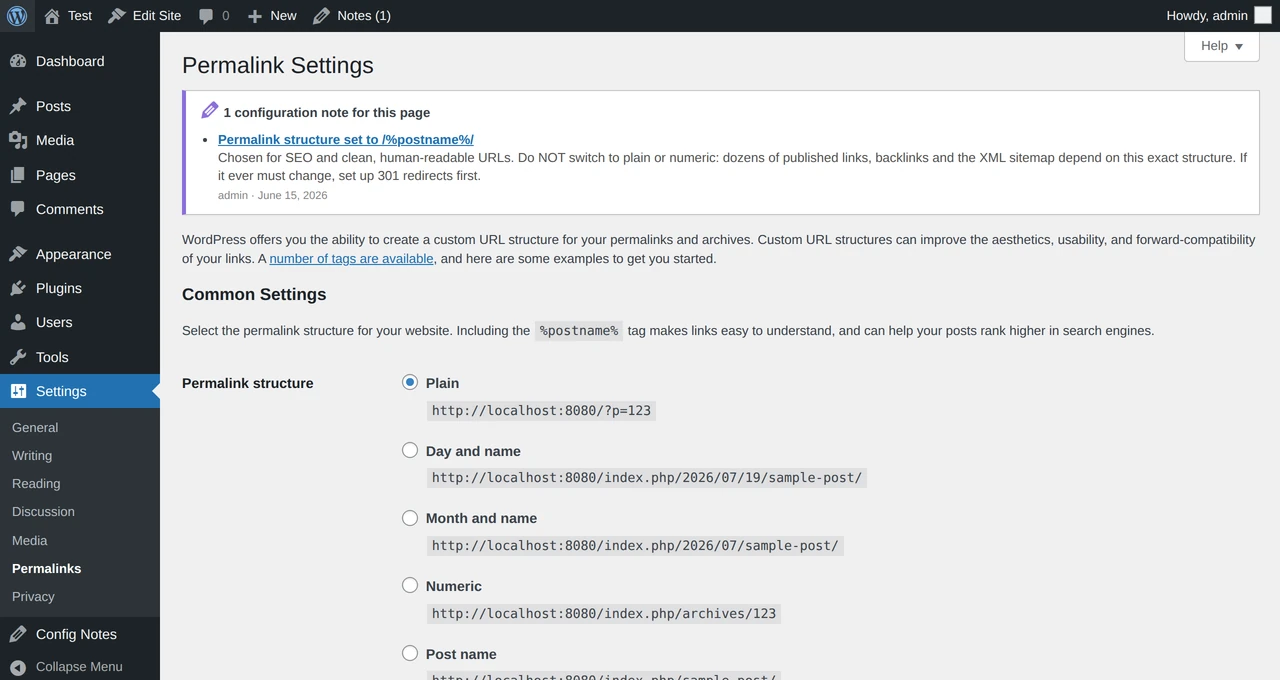
- Contextual notes: Link a note to a specific settings page and it appears automatically at the top of that page every time you open it. The explanation is always next to the setting it refers to.
- Categories: Organize notes by topic – SEO, security, cache, permalinks — and find what you need instantly.
- Automatic author & date: Every note records who decided what, and when. Essential when more than one person manages the site.
- CSV export: Download all your notes as a backup or to take them elsewhere. Excel-friendly (UTF-8), accents included.
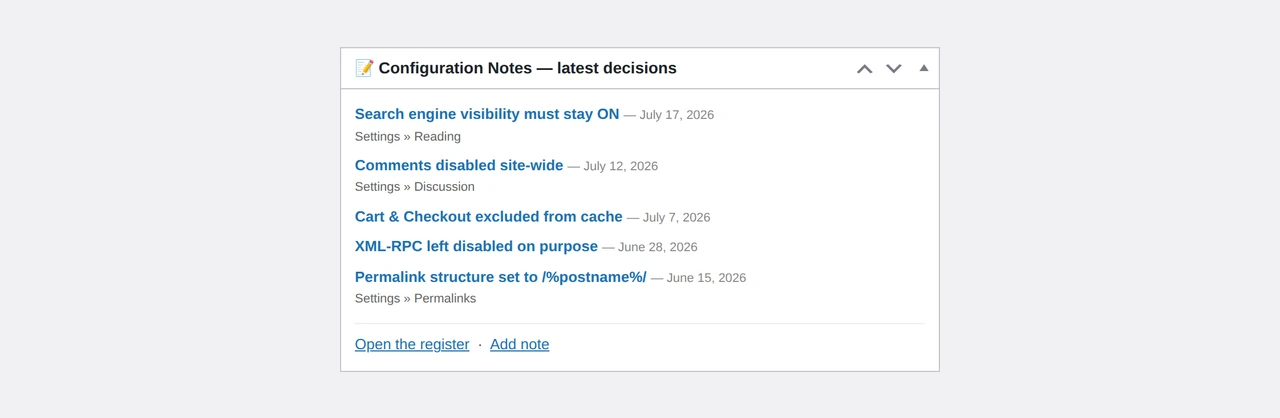
- Dashboard widget: Your latest decisions at a glance, every time you log in.
How it works, in three steps
- Install and activate. A new “Config Notes” menu appears in the sidebar right away.
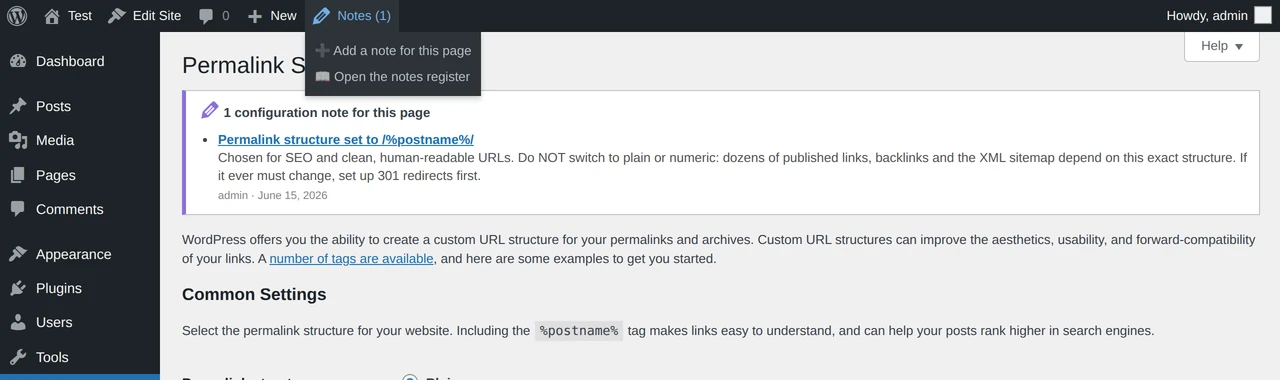
- Write down a decision. For a general note, add it to the register. For a page-specific note, open that page and use the top bar “Notes ▸ Add a note for this page” – the link fills in by itself.
- Find the why. Linked notes reappear automatically at the top of their page, before you touch anything.
See it in action
The decision register – every note with reference page, category, author and date.
The contextual note – shown at the top of the settings page it refers to.
Add a note from the toolbar – linked to the page you’re on, in one click.
The dashboard widget – your latest decisions as soon as you log in.
Why you’ll like it
- Lightweight and no-nonsense – no external dependencies, safe to keep on production sites.
- Administrators only – notes are hidden from editors and authors.
- Fully private – no external calls: everything stays in your own database.
- Multilingual – available in English and Italian.
- Free and open source – released under the GPL license.
Frequently asked questions
Start documenting your decisions
Stop relying on memory. Give your WordPress a logbook.
Versione italiana
Configuration Notes: non dimenticare più perché hai configurato WordPress così.
Ti è mai capitato di ritrovare, mesi dopo, un’impostazione che a prima vista sembra illogica e di non ricordare più perché l’avevi decisa così? La cambi “alla cieca”… e qualcosa si rompe.
Configuration Notes ti dà un posto dove annotare il perché delle tue scelte di configurazione, direttamente nella bacheca di WordPress. La spiegazione resta lì dove serve, pronta per il te del futuro (o per il collega che metterà mano al sito dopo di te).
Gratuito · Solo per amministratori · Nessun dato inviato all’esterno · Italiano e inglese
Il problema che tutti conosciamo
Ogni sito WordPress è fatto di decine di piccole decisioni: una struttura di permalink scelta per la SEO, una funzione disattivata per sicurezza, un’esclusione dalla cache per non rompere il carrello, una casella spuntata in un certo modo per un motivo ben preciso.
Sul momento la scelta è ovvia. Sei mesi dopo, no. E la memoria non aiuta: senza il perché, ogni modifica diventa un rischio.
Configuration Notes trasforma quelle decisioni in un diario di bordo, così non devi più fidarti della memoria.
Cosa fa
- Registro centrale delle decisioni: Un menu dedicato con tutte le tue note: titolo, testo, categoria, autore e data. Il diario di bordo del sito, sempre a portata di mano.
- Note contestuali: Collega una nota a una pagina di impostazioni specifica: comparirà automaticamente in cima a quella pagina ogni volta che la apri. La spiegazione è sempre accanto al setting a cui si riferisce.
- Categorie: Organizza le note per argomento – SEO, sicurezza, cache, permalink – e ritrova subito quello che cerchi.
- Autore e data automatici: Ogni nota registra chi ha deciso cosa e quando. Fondamentale quando a gestire il sito siete in più di uno.
- Esportazione CSV: Scarica tutte le note come backup o per portarle altrove. Compatibile con Excel (UTF-8), accenti inclusi.
- Widget in bacheca: Le tue ultime decisioni a colpo d’occhio, ogni volta che accedi.
Come funziona, in tre passi
- Installa e attiva. Trovi subito il menu “Config Notes” nella barra laterale.
- Annota una decisione. Per una nota generica, aggiungila al registro. Per una nota legata a una pagina, aprila e usa nella barra in alto “Note ▸ Aggiungi nota per questa pagina”: il collegamento si compila da solo.
- Ritrova il perché. Le note collegate ricompaiono automaticamente in cima alla loro pagina, prima che tu tocchi qualcosa.
Guardalo in azione
Il registro delle decisioni – tutte le note con pagina di riferimento, categoria, autore e data.
La nota contestuale – appare in cima alla pagina di impostazioni a cui si riferisce.
Aggiungi una nota dalla barra – collegata alla pagina in cui ti trovi, con un clic.
Il widget in bacheca – vedi subito le ultime decisioni appena accedi annotate con Configuration Notes.
Perché ti piacerà
- Leggero e senza fronzoli – nessuna dipendenza esterna, sicuro anche in produzione.
- Solo per amministratori – le note non sono visibili a editor o autori.
- Privacy totale – nessuna chiamata esterna: tutto resta nel database del tuo sito.
- Multilingua – disponibile in italiano e inglese.
- Gratuito e open source – rilasciato sotto licenza GPL.
Domande frequenti
Inizia ad annotare le tue decisioni
Basta affidarsi alla memoria. Dai al tuo WordPress un diario di bordo.